Hampton Bay UC7083T Remote
$20.00
Description
There’s a very specific kind of frustration that comes with losing or breaking a ceiling fan remote when the fan itself works perfectly. The Hampton Bay and Harbor Breeze fans that use the UC7083T receiver system are some of the most widely installed ceiling fans in North American homes — millions of them are sitting in bedrooms and living rooms right now — and when the original remote stops working, the replacement path isn’t always obvious. The Eogifee UC7083T is one of the most focused answers to that problem available: a remote-only replacement built specifically to match the UC7083T receiver, sold by a brand that has been doing ceiling fan remote controls since 2010 and has made it their entire business.
Before anything else, the most important thing to understand about this product is what it is and what it isn’t. This is a transmitter — a handheld remote — and nothing else. It does not include a receiver. If your existing receiver inside the fan’s canopy is still functioning properly, that’s exactly what you want, because you’re replacing only the piece that broke rather than the whole system. If your receiver has also failed, this remote alone won’t solve your problem and you’ll need to look at a full kit that includes a replacement receiver. Confirming that your existing receiver is operational before ordering saves you the return trip.
Getting the Version Right
The UC7083T remote comes in two distinct versions, and picking the wrong one is the most common mistake buyers make. One version includes a reverse button for controlling motor direction, and the other — the dim light version — includes separate up-light and down-light controls for fans with dual light systems but no reverse functionality. These are not interchangeable. The reverse button on the reverse-version remote will only work if your fan’s receiver was originally designed to support motor reversal. If your receiver doesn’t have reverse capability, having a reverse button on the remote does nothing. Similarly, the dim light version is designed for fans with two separate light sources — an upper and lower light — and won’t add that functionality to a fan that wasn’t set up for it.
The way to confirm which version you need is straightforward: look at your original remote. If it had a reverse button, get the reverse version. If it had separate up-light and down-light controls, get the dim light version. If you no longer have the original remote, check the back of the fan or inside the canopy — the receiver will have the UC7083T model designation printed on it, and the original remote’s FCC ID should match. The correct FCC ID to look for on the back of your old remote is UC7083T. If that’s what you have, this replacement will pair with your existing receiver cleanly.
Features and Controls
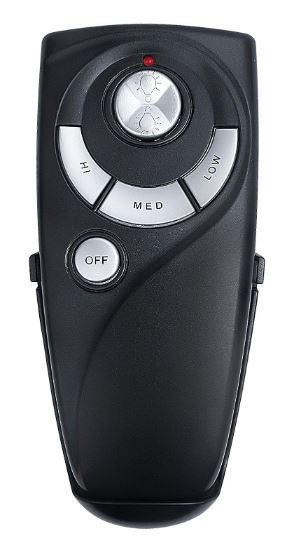
The UC7083T remote handles the essentials well. Fan speed control covers three settings — high, medium, and low — which is the standard for the AC motor fans this receiver system was designed for. The layout is logical and consistent with what Hampton Bay and Harbor Breeze owners will already be familiar with from the original remote, so there’s essentially no learning curve if you’re replacing a damaged or lost unit. The buttons are physically distinct and responsive, with no ambiguity about which function you’re pressing.
Light control depends on which version you’ve purchased. The dim light version provides separate control of the upper and lower light circuits and includes a dimming function, though it’s important to understand the LED caveat here: the dimming function works properly with incandescent and halogen bulbs, but if your fan’s light kit uses LED bulbs that aren’t specifically dimmable, the remote will only handle on and off for those. Non-dimmable LEDs won’t respond to the dimming command, which isn’t a flaw in the remote — it’s a fundamental characteristic of how LED dimming works and it applies across virtually all ceiling fan remotes that include a dimmer function. If you want full dimming capability and you’re using LEDs, making sure you have dimmable LED bulbs installed in the fan is the prerequisite.
The reverse version swaps out the dual-light controls for a single light control button plus the motor reversal function, allowing you to switch the fan between summer and winter rotation modes. Again, this only activates if your receiver was built to support reversal — the remote sends the signal, but the receiver has to be capable of acting on it.
Pairing and Setup
Setup is as simple as ceiling fan remote pairing gets, assuming your existing receiver is working. The remote uses four dip switches located in the battery compartment — tucked behind the battery slot itself, which makes them easy to overlook if you don’t know to look there. The dip switch pattern on the new remote needs to match the pattern set on the receiver inside the canopy. The easiest approach is to pull the battery cover off your old remote before discarding it and take note of or photograph the dip switch positions, then replicate that same pattern on the new remote.
If you no longer have the old remote to reference, you’ll need to access the receiver in the canopy to check its dip switch settings. That means cutting power at the breaker, removing the canopy cover, locating the receiver, and reading the switch positions. It adds a step but it’s not complicated. There are 16 possible frequency combinations across the four switches, which gives you enough range to avoid signal conflicts with other remotes in the home if you ever need to change the frequency.
Eogifee publishes the full list of frequency combinations for Harbor Breeze and Hampton Bay systems — the binary patterns from 0000 through 1000 — which is a practical resource if you’re troubleshooting interference issues or starting fresh with a receiver whose original frequency setting you don’t know.
What Eogifee Gets Right
Eogifee’s positioning in this space is notable because they describe their products as regular original OEM products rather than generic aftermarket clones. They’ve been specifically manufacturing for Hampton Bay, Harbor Breeze, and Hunter systems for well over a decade, and the product reflects that focus. The build quality on the UC7083T replacement is consistent with what you’d expect from an OEM-equivalent — not premium by any measure, but solid and functional in the way that an original remote is solid and functional. The wall mount holder is included, which is a practical addition that makes the remote easy to keep track of between uses.
The price point is one of the more attractive aspects of the product. At a fraction of the cost of a full replacement kit including a new receiver, the Eogifee UC7083T remote-only option gives you a clean, purpose-built replacement without paying for hardware you don’t need. For anyone whose receiver is still functioning well, this is the economically sensible path.
What to Watch For
A few things are worth keeping in mind before purchasing. Batteries are not included — the remote takes a single 12V battery, which is a less common size than the AA or AAA cells most people have on hand, so it’s worth having one ready rather than discovering the oversight after you’ve finished the install. The 12V battery is the small rectangular type commonly used in car key fobs and some remote controls, and it’s readily available at any hardware or grocery store, just not something most people stock at home.
The wall mount holder that comes in the box is designed for wall installation, which means this remote is intended to live in a fixed location on the wall rather than being carried around like a handheld. If your original setup had the remote in a holder mounted beside the bed or near the door, the included holder replicates that arrangement nicely. If you want a remote that you can take anywhere in the room freely without a dedicated mounting spot, it’ll still work perfectly well handheld — the wall mount is just the intended use case and the form factor reflects it.
The other thing worth being clear about is the existing receiver requirement. This remote pairs with the UC7083T receiver system specifically. If your fan uses a different receiver — a UC7078T, a CHQ7083T, or any other model number — this remote is not a match. Checking the FCC ID on the back of your old remote or on the receiver itself before ordering is the step that prevents the most common compatibility disappointment with this kind of product.
For Hampton Bay or Harbor Breeze ceiling fan owners dealing with a dead or lost UC7083T remote and a receiver that’s still working fine, the Eogifee UC7083T replacement is a clean, reliable, and appropriately priced solution. It does exactly what a replacement remote should do — pairs to the existing receiver, replicates the original control functions, and installs in minutes — without asking you to replace or rewire anything that doesn’t need to be replaced. Pick the right version for your fan’s light configuration, match your dip switches, and your fan is back under full remote control for a fraction of what a service call or full kit replacement would cost.