
Aloha Breeze ceiling fans were sold primarily through Walmart as an entry-level option for buyers working with a tight budget. They were manufactured by Litex Industries, a Texas-based company that produced ceiling fans across several budget-tier brand names over the course of roughly two decades. Litex built more capable fans under other labels, but the Aloha Breeze line was positioned at the lowest price point the company offered, and the construction reflects that. If you have one installed and are trying to decide whether to repair it or replace it, the most useful thing to understand upfront is that the fan’s replacement cost is low enough that most repairs are difficult to justify on economic grounds alone. That said, there are specific failure points on these fans that are worth addressing, and understanding the line helps you make that call without spending money on a diagnosis you could have skipped.
Litex Industries and How the Aloha Breeze Line Fit In
Litex Industries operated out of Coppell, Texas and was one of the more significant producers of budget and mid-budget ceiling fans sold through mass-market retail channels in North America during the 1990s and 2000s. The company manufactured fans under several brand names depending on the retailer and the market segment being targeted. Some of those brands landed at a meaningfully higher tier than the Aloha Breeze line, with better motor specifications, steel blade irons, and actual wood veneer on the blades rather than printed composite. Aloha Breeze was not where Litex put its engineering resources. It was the volume product, built to a price that could compete on a Walmart shelf next to other entry-level fans, and the engineering decisions made throughout the line reflect that priority consistently.
Understanding that context matters when you are trying to source parts or evaluate whether a repair is worth the effort. This was never a fan built with the expectation that someone would service it five years in. The design assumes a useful life of a few years of moderate use in a standard residential room, at which point the economics of the original purchase price make replacement the obvious path. That is not a criticism so much as an accurate description of what the product was designed to be and who it was designed for. A first apartment, a rental unit, a spare bedroom that gets occasional use, a garage workspace where appearance does not matter — those are the situations where an Aloha Breeze fan made sense at the point of sale.
Motor Size, Blade Pitch, and Why the Airflow Is Limited
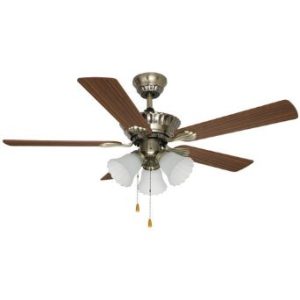
The motor housings across the Aloha Breeze line are noticeably smaller than those on mid-tier fans from Hunter, Hampton Bay, or Harbor Breeze at the same blade span. A 52-inch Aloha Breeze fan carries a motor housing that would not look out of place on a 42-inch fan from a higher-tier brand. The windings inside are wound to a lower specification, which reduces the motor’s ability to maintain consistent torque across its speed range, particularly at low speed where the electrical input is reduced and the motor is operating with the least margin above stall. This is not unusual for fans at this price point, but it has consequences for both performance and longevity. A smaller motor running closer to its design limits generates more heat per unit of airflow produced than a larger motor with more thermal headroom, and heat is the primary factor that determines how quickly a fan’s capacitor and winding insulation break down over time.
Blade pitch is the other contributor to the limited airflow these fans produce. Most Aloha Breeze models run blade pitch in the 12 to 13 degree range, which sits at the shallow end of the residential ceiling fan spectrum. Mid-range fans from the same era typically run 14 to 15 degrees, and performance-oriented fans push into the 15 to 17 degree range. Blade pitch is the primary driver of how much air a fan moves per revolution, so a two or three degree difference has a measurable impact on the CFM figure the fan produces in real use. The shallow pitch on the Aloha Breeze line is partly a cost decision and partly a motor protection decision, since a steeper pitch puts more load on the motor and a small motor running a steep-pitch blade at high speed will run hotter and fail sooner. The pitch was dialed back to keep the motor in a sustainable operating range, which extends motor life at the cost of the airflow performance the fan could theoretically deliver at its blade diameter.
The practical result is that a 52-inch Aloha Breeze fan running at high speed in a room where a well-specified 52-inch fan would produce adequate airflow will often feel noticeably less effective. In a small bedroom or a room where the fan is running primarily for white noise or light air movement rather than meaningful cooling, this is unlikely to matter. In a larger living room or an open-plan space where the fan needs to pull real work, the Aloha Breeze line was never going to perform at the level the blade diameter might suggest.
The Blade Irons and What Happens to Them Over Time
The blade irons on most Aloha Breeze models are injection-molded plastic rather than stamped steel. Plastic blade irons resist corrosion and keep the overall fan weight down, which matters for shipping cost and for the load placed on a marginal motor. But they are more prone to developing a slight droop over time, particularly in rooms that cycle through significant temperature variation between seasons. A blade iron that droops even a few degrees changes the pitch of the blade it carries, throws it out of plane with the others, and produces wobble that gets progressively worse as the deviation increases.
On a fan with steel blade irons you can sometimes correct a drooping arm by carefully bending it back toward the correct angle. Plastic does not respond well to that kind of correction. The material has memory and tends to return toward the deformed position rather than holding the correction, and aggressive attempts to bend plastic blade irons often crack them at the stress point near the motor bracket connection. A warped plastic blade iron generally means replacing the blade assembly entirely rather than adjusting it, and on a fan where blade arm availability is limited by the brand’s discontinued status, finding a matching replacement is not always straightforward.
The blades themselves across most of the Aloha Breeze line are MDF or wood composite with a printed wood-grain finish applied over the surface rather than real wood veneer. This is standard practice for budget fans and keeps manufacturing costs predictable, but it limits the blade’s ability to maintain its shape in environments with significant humidity cycling. The printed surface finish also shows wear faster than a wood veneer or painted surface would under repeated cleaning. A bathroom installation or a covered patio in a climate with significant rainfall will age these blades faster than a standard interior room. Humidity that penetrates the printed finish causes the MDF substrate to swell unevenly, which warps the blade and creates the same out-of-plane problem as a drooping blade iron, with the same limited options for correction.
Pull Chain Failures and What to Do About Them
The pull chain is the most common failure point on Aloha Breeze fans and the one repair that consistently makes economic sense. The pull chain switches on fans at this price tier are built to a lower cycle tolerance than those on mid-range fans, and they wear out faster under normal daily use. The internal mechanism either strips the detent positions that define each speed setting, or the chain itself breaks at the connection point where it feeds into the switch body. When the mechanism strips, the fan stops holding the selected speed and cycles through settings unpredictably or gets stuck at one speed. When the chain breaks at the switch, you lose the ability to operate the fan at the switch level entirely.
Replacement pull chain switches are a standard part carried by most hardware stores and available from online suppliers in the two to five dollar range. The key specification to match is the number of speeds the switch controls. A three-speed switch is not interchangeable with a two-speed switch even if the physical housing looks similar, because the internal contact configuration differs. The existing switch will have its configuration printed or stamped on the housing, and that is what you match when ordering the replacement. Swapping the switch requires removing the light kit or switch housing cover to access the switch body, disconnecting the wires from the old switch and connecting them to the new one in the same configuration, and reassembling. Photographing the wiring before disconnecting anything takes ten seconds and eliminates the most common cause of a failed repair on this job.
Capacitor Problems and When the Repair Makes Sense
The capacitor is the second most common failure on Aloha Breeze fans, and whether the repair is worth doing depends on what else is going on with the fan. When the capacitor degrades, the motor will either hum at low volume without spinning, spin at a noticeably reduced speed across all three settings, or require a manual push on the blades to get started before the motor takes over the rotation. All three of those symptoms point to a capacitor that has lost enough of its rated capacitance that it can no longer provide the phase shift the motor needs to start and sustain rotation correctly.
The capacitor itself costs between three and eight dollars depending on the microfarad rating and where you source it. The repair requires removing the existing capacitor from the switch housing, reading the µF and voltage values printed on the casing, and ordering a replacement that matches those values. The microfarad rating must match exactly. A higher voltage rating than the original is fine, since that simply means the component is built to handle more electrical stress than your fan will ever subject it to. A different µF rating changes the motor’s operating characteristics in ways that can cause additional damage to the windings over time, even if the fan runs initially without obvious problems. Do not buy a replacement capacitor from a generic compatibility listing without confirming the µF value yourself against what is physically installed in your fan.
The case for doing the capacitor repair is stronger when the fan has been running well for most of its life and the motor shows no signs of heat damage when you open the switch housing. No burning smell, no discoloration on the wiring insulation, no visible bulging or scorching on the capacitor casing itself. A fan in that condition with a degraded capacitor is a reasonable repair candidate. The case weakens significantly if the motor is making grinding or buzzing sounds that predate the speed problem, if the switch housing smells of burned insulation when you open it, or if the fan has already been through one repair cycle. At that point the remaining life in the motor is uncertain enough that putting money into the capacitor is a gamble rather than a repair.
When to Stop Repairing and Replace the Fan
For a pull chain replacement, the answer is almost always to do the repair. The part costs less than a cup of coffee and the job takes twenty minutes with a screwdriver and a basic comfort level working inside a switch housing. For a capacitor replacement on a fan that has been running well otherwise, the repair makes sense as long as you are willing to do the diagnosis correctly and source the right part. Beyond those two scenarios, the economics of repairing an Aloha Breeze fan stop working quickly.
Any failure that involves the motor windings means the fan needs a replacement motor, and for a discontinued budget fan that was originally priced in the thirty to sixty dollar range, sourcing a compatible replacement motor costs more than buying a new entry-level fan. Blade arm failures on plastic irons run into the same wall if matching replacements cannot be found through the original customer service channel. A motor that runs but vibrates excessively due to bearing wear is not worth rebuilding. A fan that wobbles because the motor housing itself has developed play at the mounting point is not worth the time it takes to attempt a fix at the bracket level.
The practical replacement target for someone moving on from an Aloha Breeze fan is the current entry-level Harbor Breeze or Hampton Bay line at Lowe’s or Home Depot. Both brands offer 52-inch fans in the fifty to eighty dollar range that move significantly more air than the Aloha Breeze, use steel blade irons, carry better motor specifications, and have parts availability through ongoing retail and customer service channels. The upgrade in airflow performance is noticeable enough in daily use that most people who make the switch comment on it, which is partly a reflection of how limited the Aloha Breeze line was rather than a reflection of how exceptional the replacement is.
Finding Your Model Number and Getting Parts
Aloha Breeze is no longer an active brand, which makes dedicated parts sourcing harder than it would be for an ongoing line. Pull chain switches and capacitors are generic enough that hardware store equivalents work without issue as long as the specifications match. For anything more model-specific, the customer service number included in the original fan paperwork is the best starting point. Litex Industries handled warranty and parts support for the Aloha Breeze line, and depending on the age of your fan, some inventory of original parts may still be accessible through that channel.
If you no longer have the paperwork, the model number is typically printed on a label attached to the motor housing. On most Aloha Breeze models it appears either on top of the housing near the mounting bracket or on the underside near where the blade irons connect to the motor. The label will show the model number, the blade span in inches, and in most cases the motor’s electrical specifications including voltage and wattage. Having that information before calling or searching for parts narrows the compatibility question significantly, since Litex produced enough variation across the Aloha Breeze line over the years that a capacitor or pull chain switch from one model does not automatically cross over to another without confirming the specifications match.