
There is a question that comes up constantly among ceiling fan owners who have started building out a smart home: do I have to buy an entirely new fan to get app control and voice commands, or is there a way to make what I already have work smarter? The answer, in most cases, is that you do not need to replace the fan at all. Universal smart ceiling fan remotes have matured into genuinely practical solutions that can bring almost any existing fan into your smart home ecosystem without touching the wiring in your ceiling, without swapping motors, and without spending anywhere near what a new smart fan would cost. The catch is that not all of these products work the same way, and understanding the difference between them is what determines whether you end up with a setup that actually fits your situation.
It helps to start with a clear definition, because the term “smart remote” gets used loosely to describe several different types of products. A truly universal smart ceiling fan remote is one that can communicate with a fan you already own — regardless of brand or original remote system — and add smartphone control, scheduling, and voice assistant compatibility on top of what that fan already does. This is distinct from a WiFi receiver kit, which requires you to open the canopy and swap out the internal receiver module, and from a smart fan switch, which replaces the wall switch and controls fan speed through voltage variation. Each of these approaches has its place, but the pure smart remote approach — where no wiring is touched at all — is the most accessible entry point for most homeowners.
Why Your Existing Fan Is Probably a Good Candidate
The majority of ceiling fans sold in the last twenty-five years or so that include a remote control use RF, or radio frequency, technology to communicate between the handheld transmitter and the receiver module inside the fan’s canopy. This RF signal is the key to how universal smart remotes work. Rather than replacing or bypassing the existing RF system, the best universal smart remotes learn the signals that your original remote already produces and then replicate those same signals on demand — through an app, through a voice command, or through an automated schedule. The fan never knows the difference. From its perspective it is receiving the same RF commands it always has, just from a smarter source.
This means that if your Hampton Bay, Harbor Breeze, Hunter, Minka Aire, or virtually any other brand of ceiling fan came with a handheld RF remote when you bought it, there is a very good chance a universal smart remote can take over control of that fan without any hardware modification. Fans that operate on pull chains only, with no remote system whatsoever, are a different story — those require a receiver kit installation before any smart remote approach becomes viable. But for the enormous installed base of remote-capable fans sitting in bedrooms and living rooms across the country, the smart remote route is usually straightforward.
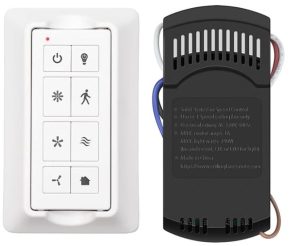
Bond Bridge: The Most Flexible Universal Approach
Bond Bridge is probably the most widely discussed product in this space, and for good reason — its approach is genuinely different from most smart home accessories. Rather than requiring you to install anything in or near the fan itself, the Bond Bridge is a small hub device that you plug into a power outlet somewhere reasonably central in your home. It contains a radio transmitter capable of learning and reproducing the RF signals from your existing fan remote. You point your original remote at the Bond Bridge, tap through a brief programming sequence in the Bond Home app, and from that point forward the app can control your fan as if it were the remote itself.
The practical result is that one Bond Bridge can handle multiple fans throughout a home — the company rates it for up to thirty devices, though ceiling fans and their light kits each count as separate devices in that calculation. Range is substantial, covering a typical home from a centrally located hub without difficulty, and the integration with Alexa, Google Home, SmartThings, and other platforms means voice control works the way you would expect once everything is set up. The Bond Bridge Pro version adds an Ethernet connection and Power over Ethernet support for more permanent installations where WiFi reliability is a concern.
The limitation worth understanding is that Bond Bridge can only replicate what your existing remote already does. If your fan remote has three speed settings and a light toggle, Bond can do exactly that and nothing more. It cannot unlock additional speed increments that the fan motor doesn’t already support, and it cannot add dimming capability to a light kit that doesn’t support dimming. Bond also works best with fans that are consistently within RF range of the hub — very thick walls or metal structures between the Bridge and the fan can occasionally cause reliability issues, though most users report solid performance in conventional residential construction.
Lutron Caseta: The Reliable Wall-Switch Approach
Lutron’s Caseta system takes a different angle on the same problem. Rather than learning your existing remote’s signals, the Caseta fan speed control replaces your existing wall switch and controls the fan directly through the wiring. This is not a pure “no-wiring” solution the way Bond Bridge is, but it is still a single-gang wall box swap that most comfortable DIYers can handle in fifteen minutes. Once the Caseta fan speed control is in place, the Pico smart remote pairs wirelessly with it using Lutron’s proprietary Clear Connect RF protocol.
The Pico remote itself is where this system earns its reputation. It offers four fan speed settings plus off, a programmable favorite-speed button in the center, and a claimed ten-year typical battery life on a single CR2032 cell. It can be held in hand like a conventional remote, placed on a tabletop pedestal, or mounted on the wall in a standard decorator-style wallplate using an adapter — which effectively gives you a second wall control location without running any new wire. For a bedroom where you want a bedside remote but also want proper wall switch control, this combination works particularly well.
The Caseta system requires Lutron’s Smart Hub if you want app control, scheduling, and voice assistant integration, which adds to the total cost of the setup. However, Lutron’s reputation for rock-solid reliability is well earned, and the Clear Connect RF technology that the Pico uses is notably more interference-resistant than standard WiFi or Bluetooth-based systems. If the Bond Bridge approach of hub learning feels uncertain, the Caseta system’s straightforward wiring relationship between the wall switch and the fan gives some people more confidence in the long-term stability of the setup.
What You Gain and What You Give Up
The honest conversation about universal smart remotes includes acknowledging what they cannot do, because the marketing around smart home products tends to oversell the transformation involved. What you genuinely gain is real and useful: app control from anywhere, voice commands through Alexa or Google, the ability to schedule the fan to turn off after you fall asleep or come on before you get home, and consolidation of multiple fans under a single interface rather than hunting for individual remotes. These are meaningful quality-of-life improvements that most people who make the switch find genuinely worthwhile.
What you give up, or more precisely what you simply do not gain, is any capability the fan does not already have. A three-speed fan with a basic light kit will remain a three-speed fan with a basic light kit. Universal smart remotes do not give you variable speed control over a motor that only has discrete speed taps, and they do not provide occupancy sensing, adaptive comfort scheduling based on temperature, or the deeper integration that purpose-built smart fans offer through their own dedicated apps. If those more advanced features matter to you, the calculus shifts toward buying a fan designed for smart home use from the ground up — but for the majority of homeowners who simply want to stop losing the remote and start using voice commands, a universal smart remote is a practical and cost-effective answer.
Checking Compatibility Before You Buy
Compatibility is the one area where it pays to do a few minutes of research before committing to a purchase, particularly with Bond Bridge. Bond maintains an online compatibility checker on their website where you can enter your fan’s brand and model number to confirm it is in their supported device database. Most major brands — Hampton Bay, Harbor Breeze, Hunter, Westinghouse, Minka Aire, Craftmade, and many others — have confirmed compatibility with a broad range of models. Fans that are not already in the database can often be added manually through the app’s signal learning feature, though this requires a bit more patience during setup.
For the Lutron Caseta approach, compatibility is less about the fan and more about the wiring situation at the wall switch. Standard single-pole wiring with a neutral wire present is the easiest scenario. Homes with older wiring that lack a neutral at the switch location may require a different approach, and three-way switch configurations need to be handled with Caseta’s companion Pico remote rather than a second wired switch. The fan motor type matters here too — Caseta’s fan speed control is designed for standard AC motor fans and may not work correctly with DC motor fans, which use a different control method.
Installation: How Involved Is This Really?
Bond Bridge installation genuinely requires no tools and no electrical work. You plug it in, download the app, and spend a few minutes per fan pointing your existing remote at the hub and tapping through the pairing sequence. For most people with RF-remote fans, the entire process from opening the box to having working voice control is under half an hour. The app is well-designed and the learning process for capturing remote signals is guided clearly enough that it rarely causes confusion even for people who are not particularly technical.
Caseta is more involved but still modest in scope. You are turning off the circuit breaker, removing the existing wall switch, connecting three or four wires to the new Caseta fan control, tucking it into the box, and attaching the wallplate. Anyone who has replaced a light switch before will find this straightforward. The Pico remote requires no wiring — it pairs wirelessly and mounts anywhere. Adding app and voice control through the Lutron Smart Hub is an additional step that involves connecting the hub to your router and completing setup through the Lutron app, but it is not substantially more complex than setting up any other smart home hub.
Which One Is Right for Your Situation
The choice between these approaches comes down to a few practical factors. If you have multiple fans in your home and want to bring all of them under smart control without opening a single canopy or wall box, Bond Bridge is the clear answer — one hub handles everything, and the per-fan cost drops significantly compared to installing individual Caseta switches throughout the house. It is also the better choice when the fan is in a location where wall switch access is difficult or where you specifically want to preserve your existing wall switch configuration.
If you have one or two fans and you prefer the reliability and polish of a purpose-built smart switch system over a hub-based approach, Caseta is worth the additional investment. The Pico remote’s flexibility — handheld, tabletop, or wall-mounted — gives you more placement options than a standard remote, and Lutron’s Clear Connect technology has a strong track record for staying connected and responsive in a way that purely WiFi-dependent systems occasionally do not match.
Either way, the core premise holds: most ceiling fans that came with a remote are already halfway to being smart fans. A universal smart remote of either type closes that gap for a fraction of what a full fan replacement would cost, with none of the installation complexity and none of the disruption to a fixture you may have already been happy with. For the ceiling fan that works perfectly well but just needs to catch up with the rest of your smart home, that is usually exactly the right answer.