
There’s something quietly frustrating about a ceiling fan remote that stops working. It’s not a dramatic failure — the fan itself is usually fine, the wiring is intact, the motor hums along perfectly — but without that remote, a fan that was installed specifically because it looked clean and wire-free on the ceiling suddenly requires you to drag a chair over and yank a pull chain like it’s 1987. For anyone who’s been there, the urgency of sorting out a remote issue doesn’t need much explanation.
Ceiling fan remote controls have become standard on most mid-range and premium fans over the past two decades, and the technology behind them has gotten genuinely sophisticated. Modern remotes don’t just toggle the fan on and off — they handle multi-speed fan control, separate light dimming, timer functions, and in some cases full smart home integration through Wi-Fi or Bluetooth. But all of that functionality also means more things that can go wrong, and more variables to sort through when something isn’t behaving the way it should. Understanding how these remotes actually work, what typically causes them to fail, and how to find a replacement when you need one makes the whole process a lot less stressful.
How Ceiling Fan Remotes Actually Work
Before diving into troubleshooting, it helps to understand what’s happening when you press a button on your ceiling fan remote. Unlike a television remote, which simply sends an infrared signal directly to a receiver on the front of the TV, most ceiling fan remotes use radio frequency transmission — RF signals — to communicate with a receiver that’s installed inside the fan’s canopy, up near the ceiling mount. This is why you don’t have to point a ceiling fan remote directly at the fan to make it work. RF signals travel in all directions and pass through walls, which is both a feature and occasionally the source of certain interference problems.
The receiver unit is the critical component in this system. It sits in the canopy, wired between the house wiring and the fan’s internal components. When you press a button on the remote, the remote transmits a coded RF signal, the receiver picks it up, and the receiver sends the appropriate electrical signal to the fan motor or the light kit. If either the remote or the receiver fails, the communication breaks down — and figuring out which one is the culprit is usually the first order of business when something goes wrong.
Some older fans and a minority of current models use infrared remotes instead of RF, similar to how a TV remote works. These require line-of-sight with a receiver, which is typically located somewhere visible on the fan housing or canopy. If you have one of these, you’ll notice that the remote only works when you’re pointing it roughly toward the fan. IR systems are less common today because RF is simply more practical for ceiling-mounted fixtures.
The Most Common Remote Problems and What’s Actually Causing Them
The overwhelming majority of ceiling fan remote issues come down to one of four things: dead batteries, a lost pairing between the remote and receiver, signal interference from other wireless devices in the home, or a failed receiver unit. Working through these in order will solve the problem in most cases without requiring any replacement parts at all.
Batteries are always the first thing to check, and they’re almost embarrassingly often the actual cause of the problem. A remote that’s been in daily use for a year or two is almost certainly running on weakened batteries, and the symptoms of low battery power in a remote aren’t always as obvious as complete failure — sometimes a weak battery causes the remote to work intermittently, or to only respond when you’re within a few feet of the fan, or to control the light but not the speed settings. Swapping in a fresh set of AAs or AAAs takes thirty seconds and rules out the most common cause immediately.
If fresh batteries don’t change anything, the next area to investigate is the pairing between the remote and the receiver. Many ceiling fan remotes use a system of dip switches — tiny physical toggle switches, usually located inside the battery compartment of the remote and on the receiver unit inside the canopy — to establish a unique communication channel between the two components. These dip switches need to be set to matching positions for the remote and receiver to recognize each other. If someone reset the fan at the breaker during a power outage, or if the settings were inadvertently changed, the pairing can be lost. Checking the dip switch positions on both units and making sure they match will often restore communication instantly. You’ll typically need to cut power to the fan at the breaker, pull down the canopy to access the receiver’s dip switches, and compare the pattern to the remote. If they don’t match, set them to the same pattern, restore power, and test.
Some remotes use a button-based re-pairing process instead of physical dip switches. The procedure varies by manufacturer but usually involves cutting power to the fan, restoring it, and then pressing and holding a specific button on the remote within a short window — often the fan power button — until the fan responds with a brief acknowledgment like a speed change or light flash. Your fan’s manual will have the specific sequence, and if you’ve lost the manual, the manufacturer’s website almost always has it available as a downloadable PDF.
Signal interference is less common but worth understanding. Ceiling fan receivers operate on specific radio frequencies, and other devices in the home can occasionally broadcast on overlapping frequencies. Cordless phones, baby monitors, garage door openers, and Wi-Fi routers are common culprits. If your remote works fine in one part of the room but loses signal near a specific area, or if the fan behaves erratically without any input, interference is a reasonable suspect. Changing the dip switch frequency settings to a different combination — there are typically multiple possible configurations — can shift the communication to a cleaner channel.
When none of the above resolves the issue, the receiver unit itself becomes the most likely failure point. Receivers are electronic components that sit in a warm environment and handle electrical loads continuously, and they do fail eventually. A failed receiver will typically result in no response at all regardless of what you do with the remote, or in partial function — for example, the light works but the fan speed doesn’t change. Replacing the receiver is a more involved fix but not an extremely difficult one for anyone comfortable working with basic household wiring. Power to the fan needs to be cut at the breaker, the canopy opened, and the old receiver disconnected and removed. The new receiver gets wired in its place following the included instructions and color-coded wiring diagram. The whole process usually takes under an hour.
Finding the Right Replacement Remote
If the remote itself has physically broken — cracked housing, stuck buttons, liquid damage — or if you’ve simply lost it and need a replacement, finding the correct remote is where a lot of people run into trouble. The challenge is that ceiling fan remotes are not universally interchangeable, even between fans from the same manufacturer. The receiver in your fan is calibrated to communicate with a specific type of remote on a specific frequency, and a random replacement remote may not be compatible with your existing receiver even if it looks similar.
The cleanest solution is always a manufacturer-direct replacement. If you have a Hunter fan, Hunter sells replacement remotes for their various receiver systems. Same with Hampton Bay, Harbor Breeze, Emerson, Casablanca, and most other major brands. The catch is that you need to know your fan’s model number to find the right remote, and that model number is usually printed on a label inside the canopy or on the motor housing — which means getting up on a ladder to check. Once you have the model number, the manufacturer’s website or a customer service call will point you to the compatible replacement.
If your fan is older and the manufacturer-direct replacement is discontinued or no longer available, universal ceiling fan remotes become the next option. Universal remotes are designed to work with a broad range of fans and receiver systems, but they often require replacing the receiver unit as well — the remote and receiver are sold together as a matched set. This is actually a cleaner solution in many cases, because you’re essentially installing a fresh control system rather than trying to match aging components. Brands like Hampton Bay, Hunter, and several third-party manufacturers sell universal remote and receiver kits that work with most standard ceiling fans regardless of brand, as long as the fan has a canopy large enough to house the receiver.
When shopping for a universal remote kit, the key things to verify are the wattage rating on the receiver (it needs to handle the combined load of your fan motor and any light kit), the number of speeds supported, whether the light control is compatible with your bulb type, and whether the remote includes any features you specifically need — like a timer, a sleep function, or separate fan and light controls. Most universal kits support three fan speeds, which covers the majority of residential fans, but if your fan has a DC motor with six or more speed settings, you’ll want a kit specifically designed for DC motor fans.
When a Fan Wasn’t Designed for a Remote
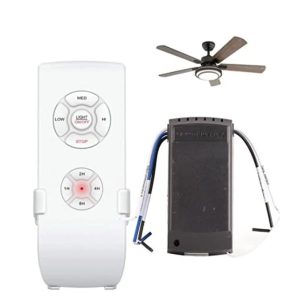
One situation worth addressing specifically is the homeowner who has a ceiling fan with no remote capability at all — typically an older fan that was controlled entirely by pull chains or a wall switch — and wants to add remote control without replacing the entire fan. This is actually very doable in most cases. Aftermarket remote receiver kits can be installed in the canopy of most standard ceiling fans, converting them to remote operation. The receiver gets wired into the existing circuit the same way a factory-installed receiver would be, and the included remote then controls the fan from anywhere in the room.
The main limitation here is physical space. The canopy on some older or more compact fans may not have enough room to house a receiver comfortably. If that’s the case, some receiver kits are designed to be installed in the wall switch box instead, which gives you wall control plus remote control without any changes to the fan itself. These switch-based receivers are a particularly elegant solution because they also give you a physical backup control point on the wall — handy for anyone who doesn’t want to rely entirely on the remote.
Smart Remotes and App-Based Control
The ceiling fan market has shifted significantly toward smart home compatibility over the past several years, and if you’re already replacing a remote or upgrading an older fan’s control system, it’s worth considering whether a smart remote or smart receiver kit makes sense for your setup. These systems typically connect to your home’s Wi-Fi network and allow control through a smartphone app, voice assistants like Amazon Alexa or Google Home, and in some cases through schedules and automation routines.
Smart fan controllers from brands like Bond, SmartThings, and others can work with existing RF ceiling fan remotes by acting as a bridge — they learn the signals your existing remote sends and then replicate them on command from an app or voice assistant. This is one of the simplest ways to add smart control to a fan that already has a working remote, because it doesn’t require any wiring changes at all. The Bond bridge simply sits on a shelf or table in the same room and handles the translation between app commands and the fan’s existing RF receiver.
For fans that are having their receiver replaced anyway, smart receiver kits that connect directly to Wi-Fi are a cleaner long-term solution. They eliminate the need for a separate bridge device and typically offer more precise control — exact fan speed percentages rather than fixed low/medium/high settings, for example. Hunter’s SIMPLEconnect system and similar proprietary smart platforms from other major brands are built around this approach.
Getting the Right Help When You’re Stuck
One of the genuinely useful things about ceiling fan remotes compared to other home appliances is that there’s a large and active community of people who’ve dealt with exactly your problem, often with your exact fan model. If you’ve worked through the basic troubleshooting steps and you’re still stuck — or if you’re trying to identify an old remote for a discontinued model, or figure out whether a specific universal kit is compatible with your specific fan — asking in a forum or community space dedicated to ceiling fans is often the fastest route to a real answer. Someone has almost certainly dealt with the same combination before.
The other valuable resource is the fan’s serial number, which is usually printed on the motor housing inside the canopy alongside or near the model number. The serial number can sometimes tell the manufacturer’s customer service team not just what model the fan is, but when it was manufactured and what receiver generation it uses — which can be the difference between a compatible replacement and one that won’t pair no matter what you do.
Ceiling fan remotes don’t last forever, and they don’t always fail in obvious ways. But the good news is that in most cases the fix is straightforward, the replacement parts are readily available, and getting your fan back under proper control is a couple of hours of patience at most. The pull chain retirement can wait.
Ceiling Fan Remotes for Sale
If you’ve worked through the troubleshooting steps and confirmed that a replacement remote or full kit is what you need, the products below cover the most common ceiling fan receiver systems on the market. Whether you’re replacing a lost Hampton Bay FAN-HD, tracking down a UC7083T for a Harbor Breeze fan, or upgrading an older pull-chain fan to full remote control with a universal kit, the options listed here are sourced from trusted sellers and represent some of the best-matched replacements available for each system. Before purchasing, take a moment to check the FCC ID printed on the back of your original remote — or on the receiver inside your fan’s canopy — to make sure the replacement you’re considering is compatible with your specific setup.
Not every remote works with every fan, and the single most common mistake buyers make is assuming a remote that looks similar to the original will pair with their receiver. Compatibility is determined by frequency and receiver generation, not appearance. The selections below are organized to make that matching process easier, with each product clearly noting the receiver models and FCC ID numbers it’s designed to replace.
-
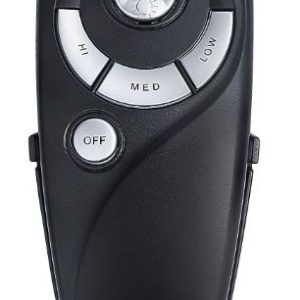
Hampton Bay UC7083T Remote
$20.00 Buy Hampton Bay UC7083T Remote -
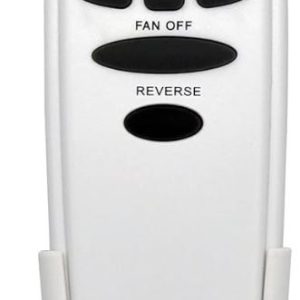
HD6 Replacement Remote for Hampton Bay Hunter Ceiling Fan Remote Control
$16.00 Buy HD6 Replacement Remote for Hampton Bay Hunter Ceiling Fan Remote Control -
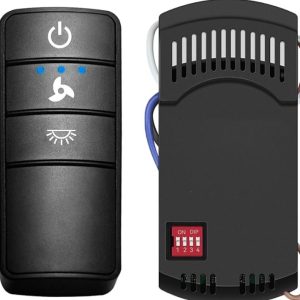
Universal Hampton Bay Hunter Harbor Breeze Remote
$36.00 Buy Hampton Bay Hunter Harbor Breeze Remote