
Hampton Bay is the most widely installed ceiling fan brand in North America by a significant margin, and it got there the same way most Home Depot house brands did — by offering reliable, attractive products at prices that made them the obvious choice for builders, contractors, and homeowners furnishing new construction or replacing an aging fan on a budget. Walk through any subdivision built in the last thirty years and you’ll find Hampton Bay fans in the bedrooms, the living rooms, the covered patios. They’re everywhere, and that ubiquity is both their greatest strength and the reason that the replacement parts market around them is so well developed. When something breaks, stops working, or needs an upgrade, you’re not hunting through obscure specialty catalogs or waiting six weeks for an overseas shipment. The parts exist, they’re affordable, and with a little know-how, most replacements are well within DIY territory.
That said, Hampton Bay’s sheer volume of models is also the source of most people’s frustration when trying to find parts. The brand has produced hundreds of distinct models over the decades, and the components are not freely interchangeable between them. A blade set from a 52-inch Midili won’t mount correctly on a 52-inch Carriage House, even though both are Hampton Bay fans of the same diameter. The mounting holes are in different positions, the blade iron angles differ, and the finish options don’t necessarily cross over. This is why the first thing you need to do — before you search Amazon, before you call Home Depot, before you do anything — is find your model number.
Finding Your Model Number
The model number on a Hampton Bay ceiling fan is printed on a label affixed to the motor housing. On most models it’s on the flat top surface of the motor, which means you’ll need to look up from below with a flashlight or use your phone camera to get a clear shot. On some older units it’s on the side of the housing near where the canopy meets the motor, and on a handful of models it’s inside the canopy itself, which requires removing the canopy screws to access. The label will show both the model number and the UPC, and sometimes a revision letter indicating which production run your fan came from — that revision letter matters for certain parts, particularly blade irons and light kit adapters, so note the whole string.
If the label has been painted over, fallen off, or is otherwise unreadable, your next option is the original manual. Hampton Bay manuals are available for download through Home Depot’s website by model number, but if you don’t have the model number you’ll need to work backwards. The fan’s physical characteristics — blade span, number of blades, motor housing shape, canopy style, and any distinguishing design features — can usually get you to the right model through Home Depot’s search or through ceiling fan enthusiast communities where people have catalogued and cross-referenced Hampton Bay’s lineup extensively.
Replacement Blades
Blade replacement is one of the most common Hampton Bay repairs, whether you’re dealing with a cracked or warped blade, a finish that’s peeled, or simply a desire to change the look of an otherwise functional fan. Hampton Bay blade sets are sold in packs of five for five-blade fans and four for four-blade fans, and they come pre-drilled with the mounting holes positioned for that specific model. This is important: do not assume that any Hampton Bay blade set will fit your fan. The hole spacing, blade iron angle, and even the thickness of the blade material vary by model.
When ordering replacement blades, you’re looking to match four things — the blade span (the length from tip to tip when mounted on the fan, not the blade length itself), the blade iron hole pattern, the finish, and the pitch. Blade pitch is measured in degrees and affects both airflow performance and the load on the motor. Hampton Bay typically specs their blades between 12 and 15 degrees of pitch, and while running a slightly different pitch won’t damage the fan in most cases, staying with the OEM specification keeps the motor working within its designed parameters and ensures you get the airflow the fan was rated for.
Home Depot is the first place to check for Hampton Bay blade replacements, and for current production models they’ll usually have them either in-store or available to order. For discontinued models, Amazon often has third-party blade sets cross-referenced to Hampton Bay model numbers, and many of these aftermarket sets are excellent quality. eBay is worth checking for truly old or obscure models, where you’ll sometimes find NOS (new old stock) blade sets pulled from warehouses or lightly used fans being parted out. Ceiling fan specialty retailers like Ceiling Fan Mall and The Ceiling Fan Guys also maintain deep Hampton Bay parts inventories and are worth bookmarking.
Blade Irons and Blade Brackets
Blade irons — the metal arms that attach the blades to the motor housing — are less often replaced but more critical to the fan’s function and balance than most people realize. A bent or cracked blade iron causes the kind of wobble that no amount of balancing kit adjustment will fix, because the problem isn’t weight distribution, it’s geometry. If your fan wobbles and you’ve already ruled out a loose mounting bracket and checked that all blade screws are tight, inspect each blade iron individually. Hold a straightedge against the flat mounting surface and look for any deflection. Even a millimeter of bend can cause noticeable wobble at speed.
Replacement blade irons need to match the original exactly — same hole pattern at both the motor and blade ends, same angle, same length. Hampton Bay blade irons are model-specific. Home Depot stocks them for current models, and the same aftermarket and eBay sources that carry blades will often have irons as well. If you find the irons are unavailable and the blades themselves are fine, it’s sometimes possible to carefully straighten a mildly bent iron with a vice and some patience, though this is a last resort.
Replacement Remotes and Receivers
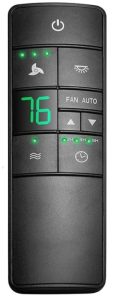
Remote controls are probably the most searched Hampton Bay replacement part, and with good reason — the original remotes get lost, the batteries corrode and damage the contacts, or the receiver inside the fan stops pairing after a power surge. The situation is more complicated than most people expect because Hampton Bay has used multiple different remote systems across their model lineup, and they’re not universally cross-compatible.
The most widely compatible Hampton Bay replacement remote is the UC7078T, which works with a broad range of Hampton Bay fans produced over the past fifteen years. It handles three fan speeds and a full-range light dimmer, uses a 9-volt battery, and the receiver mounts inside the canopy in place of your existing one. At under $25 shipped on Amazon, it’s the first thing to try when your original remote fails. The UC7078T is a universal-style replacement that pairs via dip switches — you set matching switch positions on both the remote and receiver to establish the connection, which also means you can run multiple fans in the same house without them interfering with each other.
For fans that use a different receiver protocol — particularly some of the newer Hampton Bay models with integrated Bluetooth or Wi-Fi capability, or older fans with proprietary RF frequencies — you’ll need to pull the receiver out of the canopy and match the replacement to the receiver model number, not the fan model number. The receiver is the white or black cylindrical module wired into the canopy, and its model number is printed on the housing. This is the most reliable way to ensure compatibility, especially if you’re sourcing from Amazon or eBay where listings sometimes have incomplete compatibility information.
If your remote is functional but simply won’t pair, try resetting the receiver before replacing anything. On most Hampton Bay receivers, you can reset the pairing by cycling power to the fan — turn off the wall switch, wait thirty seconds, turn it back on, then within thirty seconds hold the “Hi” button on the remote until the fan responds. This clears any stored pairing and lets you re-establish the connection from scratch. It solves the problem more often than you’d think.
Light Kits
Hampton Bay light kits are designed to attach to the bottom of the motor housing via a central mounting bolt and a wiring harness that passes up through the motor. Not all Hampton Bay motors are light kit compatible — some older or lower-end models have a solid bottom cap with no provision for a light — but the majority of their lineup supports one. The key compatibility factor is the mounting interface: the diameter of the mounting hole and the thread pattern of the central bolt. Hampton Bay has standardized this across most of their lineup, but there are exceptions, particularly in their oldest and newest models.
When ordering a replacement light kit, verify the mounting diameter and check that the wiring harness plug style matches what’s coming out of your motor. Most Hampton Bay light kits use a standard two-wire plug for the light circuit, but some integrated models with separate fan and light circuits use a three-wire or four-wire connection. If you’re replacing a failed light kit with the same model, you don’t need to worry about this — but if you’re upgrading or swapping in an aftermarket kit, matching the connector matters.
Glass shades for Hampton Bay light kits are sold separately and are worth mentioning because they’re one of the more commonly needed parts on older fans. The glass fitter size — the diameter of the opening that fits over the bulb socket — is typically either 2.25 inches or 4 inches on Hampton Bay kits. Measure your existing shade’s fitter opening before ordering. Home Depot stocks a reasonable selection, and sites like Lamps Plus and Lighting Universe have far broader selections if you want to change the look of the light kit while you’re at it.
Pull Chains
Pull chain switches fail more often than most people expect, because every time you pull the chain you’re mechanically cycling a small rotary switch through its detents. On a frequently used fan, that adds up quickly. The symptom is usually a fan that’s stuck on one speed and won’t cycle through the others, or a fan that won’t turn on at all despite good power to the fixture. Before assuming the motor is gone, pull the switch housing off the motor and test the switch directly with a multimeter. If it’s not switching continuity between positions, the switch is the culprit, not the motor.
Hampton Bay pull chain switches use a standard 3-speed rotary switch that’s almost entirely universal across ceiling fan brands. The connectors vary, but the switch body itself — available on Amazon for a couple of dollars — fits virtually every Hampton Bay pull chain configuration. The replacement process involves disconnecting the wires from the old switch (photograph the connections first), removing the switch from its housing, and installing the new one in the same orientation. It’s a twenty-minute repair that saves you the cost of a service call or a whole new fan.
Capacitors
If your Hampton Bay fan hums but won’t spin, spins slowly on all speeds, or starts only when you give the blades a gentle push, the capacitor is the likely culprit. Capacitors are small cylindrical or oval components wired into the motor, and they degrade over time — especially in humid environments or on fans that run continuously. Hampton Bay uses different capacitor values across their models, so when replacing one you need to match both the microfarad (µF) rating and the voltage rating exactly. The capacitor value is printed on its casing. Replacement capacitors are inexpensive and available through Amazon or electronics suppliers, and the replacement is straightforward if you’re comfortable working with the wiring inside the motor housing with the power off at the breaker.
Where to Shop for Hampton Bay Parts
Home Depot is the starting point for any Hampton Bay parts search, both in-store and online. As the brand’s exclusive retail partner, they carry the deepest inventory of current-model parts and are often the only source for items like blade sets and light kits for fans still in production. For discontinued models and aftermarket alternatives, Amazon is the most convenient option — the selection is vast, the compatibility information is generally reliable for Hampton Bay-specific listings, and the return process is easy if something doesn’t fit. eBay fills the gap for truly obsolete parts, original remotes, and vintage hardware. For anything you can’t find through those three channels, Hampton Bay’s customer service line is worth a call — they can sometimes point you to remaining distributor stock or suggest a compatible replacement from a current model.